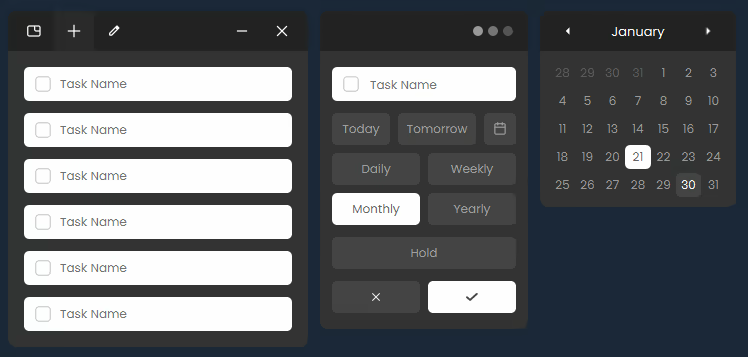
A floating task manager that stays in the corner of your screen. Add, complete and track tasks while using other apps. Stay organized throughout your day.

Sign in to add this item to your wishlist, follow it, or mark it as ignored

Free Demo

Play Task Dock Demo

Check out the full game


About This Demo

Task Dock is a minimalist task manager that stays on top of your screen, designed to help you keep routines and get things done.

Keep your tasks visible while you work, so you can stay focused without interrupting your workflow. Add your daily tasks, keep them on screen, and build a simple routine that fits naturally into your day. Designed to stay out of the way, Task Dock lets you work in any app while your tasks remain quietly present, reducing distractions and supporting long-term consistency.


Features

  • Always on top – your tasks stay visible while you work

  • Works over most apps – browser, documents, games (borderless)

  • Unobtrusive design – stays out of your way

  • Distraction-free – focus on what matters

  • Minimalist interface – no clutter, no noise

  • No setup required – open and start using

  • Daily task management – simple and fast

  • Lightweight and performance-friendly

Designed for windowed and borderless workflows

Demo Features

  • Includes all core features of Task Dock

  • Provides full access to the app (up to near release)

  • Additional features only available in the full version

  • No customization options

AI Generated Content Disclosure

The developers describe how their game uses AI Generated Content like this:

Some store page visual assets, including the title logo and certain promotional images, were created using generative AI tools and later refined manually. The application itself does not use generative AI at runtime.

System Requirements

Windows
macOS
SteamOS + Linux
    Minimum:
    • OS: Windows 10, Windows 11
    • Processor: Intel Core i3 or equivalent
    • Memory: 4096 MB RAM
    • Graphics: Integrated graphics
    • DirectX: Version 11
    • Storage: 200 MB available space
    Recommended:
    • OS: Windows 10, Windows 11
    • Processor: Intel Core i5 or equivalent
    • Memory: 8192 MB RAM
    • Graphics: Integrated or basic dedicated graphics
    • DirectX: Version 11
    • Storage: 200 MB available space
    Minimum:
    • OS: macOS 11 (Big Sur) or newer
    • Processor: Intel Core i3 or Apple Silicon
    • Memory: 4 GB RAM
    • Graphics: Integrated graphics
    • Storage: 200 MB available space
    Recommended:
    • OS: macOS 12 (Monterey) or newer
    • Processor: Intel Core i5 or Apple Silicon
    • Memory: 8 GB RAM
    • Graphics: Integrated graphics
    • Storage: 200 MB available space
* Starting February 15, 2024, the Steam Client will no longer support 32-bit games or macOS 10.14 or lower.
    Minimum:
    • OS: Ubuntu 20.04 LTS or equivalent
    • Processor: Intel Core i3 or equivalent
    • Memory: 4 GB RAM
    • Graphics: Integrated graphics
    • Storage: 200 MB available space
    Recommended:
    • OS: Ubuntu 22.04 LTS or equivalent
    • Processor: Intel Core i5 or equivalent
    • Memory: 8 GB RAM
    • Graphics: Integrated graphics
    • Storage: 200 MB available space
There are no reviews for this product

You can write your own review for this product to share your experience with the community. Use the area above the purchase buttons on this page to write your review.